Sitemap Architect: Build a Site Structure That Ranks (SEO, AI, GEO)
Sitemap Architect: Build a Ranking Site Structure (SEO, AI, GEO)

Most websites grow “organically”: a page is added, then another, then a blog post, then a service page, then a second language... and before you know it, your structure resembles an urban planning accident. Everything exists, but nothing naturally points the way anymore.
That's not just a UX problem. It's an SEO problem. And in recent years, it's also become an AI problem: search engines and answer engines (AI answers) favor sites with a logically structured theme, clear hubs, consistent URLs, and internal linking that signals importance.
Therefore, a Sitemap Architect isn't just a “sitemap export button.” It's a design table: you first build a content map (structure, pages, clusters, internal links, metadata), and only then do you publish. This is exactly what you need if you want to:
This sitemap guide provides both the system and practical steps to build a structure that ranks.
⚡ TL;DR: What a High-Ranking Site Structure Always Has
- Clear hubs: 1 topic = 1 hub (pillar/hub page)
- Logical clusters: sub-pages that cover one question/intent in depth
- Consistent URL rules: predictable, short, scalable
- Purpose-driven internal linking: links send authority and context
- Indexing discipline: no thin archives, no duplicates, correct canonicals
- Multilingual/geo strategy: variants only where there is genuine unique value
- Data-driven iteration: structure evolves, but according to governance
❓ What's the Difference Between an XML Sitemap and a Content Map?
Important distinction:
Technical signal: “these are my URLs”
Strategic plan: “this is my information architecture”
Many teams generate an XML sitemap and think it's “SEO ready.” But the real gains come before that: in the design.
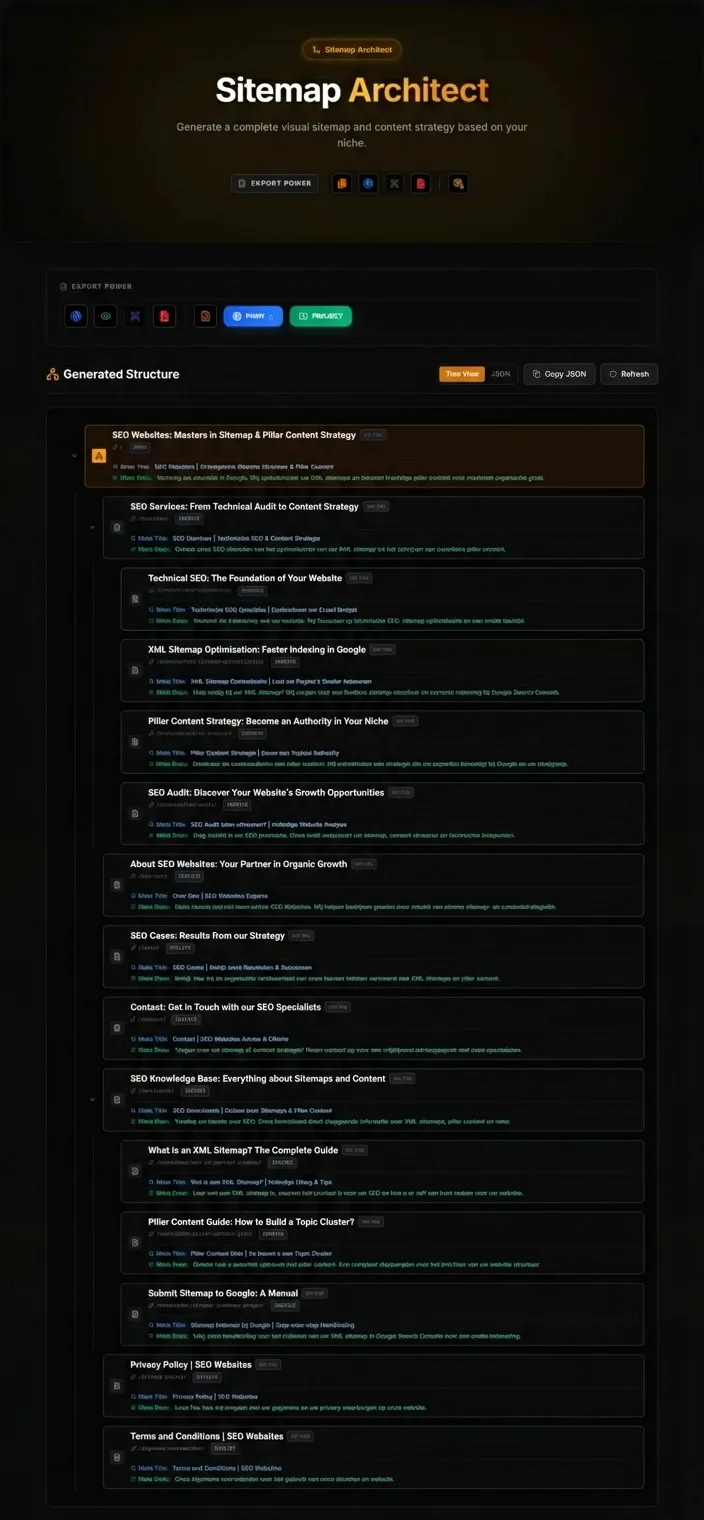
💡 Sitemap Architect helps with your content map:
- which pages should exist?
- what is the hierarchy?
- which pages are hubs?
- which pages offer support?
- how do you link internally?
- which metadata belongs where?
- which variants (language/geo) are useful?
Why Site Structure Determines Your Rankings (Even With Great Content)
Even strong content can get stuck if your structure is weak. These are the classic symptoms:
1) Pages don't signal importance
If everything links to everything, you send no clear signals. Google sees a flat web.
2) Unintended Keyword Cannibalization
Two pages target the same intent because there was no plan.
3) Archive Pages Become Thin Content
Tags, categories, filters… WordPress can be notorious for this.
4) Internal Links Are "Historical," Not Strategic
Old posts don't link to new hubs. New posts link randomly to old ones.
5) Multilingual or Geo-Variants Become Duplicates
Local pages that are 90% identical dilute authority.
A solid structure prevents these issues proactively.
🧱 The Building Blocks of a High-Ranking Structure
You can view a site structure as 5 layers:
- Top-level navigation (what's the offering? what's important?)
- Hubs / pillars (themes you want to build authority on)
- Clusters (sub-questions, sub-themes, use cases)
- Support content (cases, definitions, checklists, updates)
- Utility pages (contact, about, privacy, tools, etc.)
Your Sitemap Architect plan should consciously address each of these layers.
🎯 Step 1 — Start with "Topics," Not Pages
A classic mistake: people start with “we need 20 pages.” That's the wrong starting point. Begin with topics:
Topic = a set of questions that together form a single theme
For SEO, you want topics that are:
- broad enough (with dozens of related queries)
- relevant to your product
- convertible (tool match)
For SEO Supercharger, logical topics include:
Site Structure & Sitemaps
On-page SEO & Snippet (SERP)
Content Planning & Clusters
Multilingual / Geo
Ideally, each topic gets a hub/pillar.
🔑 Step 2 — Create One Hub (Pillar/Hub Page) Per Topic
A hub/pillar page does three things:
- provides an overview
- organizes sub-topics (clusters)
- captures the broadest intent
Practically speaking:
“the complete guide”
“one specific problem per page”
This allows you to “concentrate” authority.
📋 Step 3 — Divide into Clusters with Intent Purity
Clusters aren't “small blog posts.” They are functional components of your topic.
- one clear question
- one clear intent
- minimal overlap with other clusters
- links back to the hub
- can rank for long-tail keywords
- “everything about…” (that's a hub's job)
- “tips” without clear scope
- repetition of the hub content
- multiple intents on one page
⚡ Pro Tip
if your cluster has 5 different H2s, each worthy of its own article, then your cluster is too broad.
🔗 Step 4 — URL Structure: Choose One Rule and Stick to It
URLs aren't just for SEO. They are for:
- predictability
- maintenance
- internal links
- scalability
- multilingualism
Recommended Pattern (as you use it)
For blogs:
/nl/ai-generator-blog/{categorySlug}/{slug}

For hubs (category archives):
/nl/ai-generator-blog/{categorySlug}

For tools (app routes):
/nl/{toolSlug}
or your chosen tool routing
⚠️ Important
avoid duplicate slugs (as you rightly noted). Archive URL = category, not category/category.
🗺️ Step 5 — Plan Internal Linking Like Drawing a Metro Map
Your internal linking plan is your authority plan.
Basic Model
- Hub links to all clusters (contextually)
- Clusters link back to the hub
- Support content links to hubs/clusters where relevant
- Link utility pages minimally (unless relevant)
Why "Contextual" is Important
Why this matters
Links within the relevant paragraph (“this belongs here”) provide stronger semantic signals than a random “related articles” list.
Anchor Text Rules
- descriptive
- variation without vagueness
- no “click here”
🚫 Step 6 — Indexing Discipline: What to Index and What Not To?
A structure that ranks is also a structure that doesn't accidentally index hundreds of thin pages.
Typical Indexing Risks (WordPress)
- tag archives
- author archives
- date archives
- filter variations
- paginated pages
Your Sitemap Architect helps you choose:
- which archives add value (intro + curated links) → indexable
- which are thin → noindex or disable
- where canonicals are needed (duplicates), and where they are not
🤖 Step 7 — SEO + AI Optimization: Build Answerable Hubs
AI answers prefer pages that:
- provide definitions
- offer step-by-step guides
- include checklists
- briefly answer FAQs
- link to deeper dives
Therefore, your hub/pillar must contain “answer blocks,” even if it's long.
Standard Answer Blocks to Incorporate
- TL;DR
- “What is...?”
- “How to do it in steps”
- “Common Mistakes”
- “Checklist”
- “FAQ”
These aren't tricks. This is simply good educational practice.
🌍 Step 8 — Geo-Targeting: Multilingual and Geographical Without Duplicate Content
Geo-targeting is only beneficial when there's genuine unique value.
- different market/terminology (e.g., UK vs US English)
- different regulations, pricing, examples
- local intent ("SEO agency London" vs "SEO agency Manchester")
- only replacing the place name
- 90% identical text
Sitemap Architect approach:
- 1 main version per intent
- additional variants only where content truly differs
- internal linking that explains the relationship (hub per country/region)
⚙️ The Sitemap Architect Workflow (How to Do This in SEO Supercharger)
Use this as your “operating system.”
1) Choose Project Type and Scope
- website or website + blog
- number of core pages
- services/topics (up to 6, according to your workflow)
- language variants
2) Build Your Content Map
- define categories/hubs
- define clusters
- finalize slugs
- note internal linking points
- (optional) meta titles/descriptions
3) Generate Structure
- sitemap output
- actions: export, WP push, add project (your workflow)
4) Validate Before Publication
This is where SEO Generator acts as a quality gate:
- canonical checks
- headings
- internal links
- meta limits
- overlap detection
5) Publish in the Right Order
- hub/pillar first (v1)
- 2–3 clusters
- expand based on data
💡 Practical Example: One Topic From 0 to 10 Strong Pages
✨ Topic: “SEO Structure & Content Architecture”
Hub/pillar (1):
- Pillar Content on WordPress… (overview)
Clusters (8):
- canonicals
- cannibalization
- internal linking
- blog category SEO
- topic clusters vs. silos
- content map planning
- governance
- internal link audit
Support (1+):
- checklist post
- case study
- template download
This set is thematically tight, internally connected, and expandable.
❌ Common Mistakes (and How to Avoid Them)
Too many pages without hubs
Every topic gets one hub. Everything points to that hub.
“we'll do internal linking later”
Internal links are part of your blueprint. Plan them in Sitemap Architect.
Tags/Categories as a "Junk Index"
Limit taxonomy, make archives valuable, or noindex them.
Local Pages as Copy/Paste
Geo-variants only for genuine differences. Otherwise, one strong page.
Title/Meta as an Afterthought
SERP Optimizer workflow for CTR.
🛠️ Tool CTAs
Plan Your Site Structure in Sitemap Architect
Build your categories, hubs, and clusters as one cohesive content map. This way, you publish faster, more consistently, and without overlap.
Open Sitemap Architect →Validate Your Pages Before Publication
Let SEO Generator check for canonicals, internal links, headings, and overall SEO quality to prevent errors from escalating.
Open SEO Generator →✅ Checklist: "A Site Structure That Ranks"
- Every topic has one hub/pillar
- Clusters have one intent per page
- URLs follow one consistent pattern
- Hub ↔︎ cluster links are planned and contextual
- Thin archives are avoided or noindexed
- Canonicals only where duplicates exist
- Answer blocks are present (TL;DR, steps, checklist, FAQ)
- Multilingual/geo variants only for genuine unique value
- Publication order: hub first, then clusters
- Iteration based on data (CTR, query drift, internal link audit)
❓ FAQ (Concise, AI-Friendly)
❓ Is an XML Sitemap Enough for SEO?
No. An XML sitemap is a technical signal. The real SEO gains come from your content map: hubs, clusters, internal links, and intent.
❓ How many hubs/pillars do I need?
Start with 1–3 topics where you want to gain the most traction. Fully develop those (hub + 6–10 clusters) before expanding.
❓ Can I adjust my site structure later?
Yes, but it's more costly. That's why you design first. If you need to adjust: do so with redirects, canonicals where necessary, and update internal links.
❓ Should I index all variants (language/geo)?
Only if they provide unique value. Otherwise, you create duplication and dilute authority.
🏆 Conclusion: Structure is the Advantage Your Competitors Underestimate
Content is visible. Structure is invisible. And that's precisely why structure is often the true competitive advantage. A solid Sitemap Architect approach makes your site predictably strong: every new page fits, strengthens the whole, and builds authority instead of fragmenting it.
🎯 Key Takeaway
If you take one thing away: build your map first, then your streets.
That's how you build a site that ranks — in Google and in AI answers.
The focus of a Sitemap Architect lies in strategic design, not just technical output. This is key to building a site that isn't just easily found but also AI-friendly. A robust Sitemap Architect allows you to plan and execute your content landscape with maximum impact.
“An effective Sitemap Architect acts as an information conductor: it ensures every page knows its role, collaborates with other pages, and thus strengthens the whole for both users and search engines. This is the blueprint for sustainable online growth.”
Related articles
- Why You Should Build a Sitemap and Website Structure First for SEO
While content is key, effective SEO starts earlier. Discover why building a solid sitemap and clear website structure is the foundational step for improved search rankings.
- Scalable SERP Meta Optimization: Titles and Descriptions that Drive Clicks
Master scalable SERP meta optimization. Learn to craft click-worthy titles & descriptions that boost CTR, improve SEO strategy, & drive organic traffic. Get.
- Why WordPress XML Import Best Practices (and Pitfalls) Are Essential
Learn everything about WordPress XML import. Discover best practices and common pitfalls. Prevent errors and optimize your data transfer today. Read our.
- Multilingual Sitemaps: URL Structure & Hreflang Strategy for Global SEO
Master multilingual sitemaps, URL structure, and hreflang strategy for superior international SEO. Optimize your global website to attract more visitors now!
- Service Page Structure: From 6 Topics to 30 Pages Without Overlap
Optimize your service page structure: scale from 6 core topics to 30 unique pages without overlap. Learn to expand content and boost SEO. Read our guide!