Canonical & hreflang in your React Apps: The Correct Implementation Guide
Canonical & hreflang in your React App: Best SEO Implementation

Implementing Canonical & hreflang in your React app correctly is essential for modern search engine optimization. Because Single Page Applications often struggle with dynamic metadata that search engines find difficult to index, proper configuration is crucial. By leveraging tools like React Helmet or server-side rendering (SSR), you ensure that crawlers correctly identify the right language versions and source pages. This also prevents duplicate content issues within complex JavaScript environments.
Successful management requires synchronization between client-side routing and the HTML head. Use advanced techniques to effectively guide crawlers and enhance the user experience. Ensure every route includes unique tags for maximum SEO impact.
- Use React Helmet for dynamic tag injection.
- Implement server-side rendering for improved indexing.
- Verify hreflang attributes via Google Search Console.
- Always set a self-referencing canonical tag.

Why SEO tags are Essential for Modern React Applications
In today's digital landscape, building a fast interface with React is only half the battle. While Single Page Applications (SPAs) excel in user experience, they often pose a challenge for search engines attempting to understand content structure. Without proper metadata, search engines may struggle to index the relationship between pages. Therefore, correctly implementing meta-information is an absolute necessity for organic visibility. The topic of Canonical & hreflang in your React app is central to preventing duplicate content and language confusion.
Canonical & hreflang in your React app is crucial for indexing.
The Challenge of Client-Side Rendering

When a React application is client-side rendered, a crawler initially often sees only an empty HTML skeleton. Although modern bots are improving at executing JavaScript, the risk remains that essential tags may not be picked up. This is where dynamic SEO optimization for React comes into play. By utilizing React Helmet or by transitioning to Server-Side Rendering (SSR) with frameworks like Next.js, you ensure that the correct tags are immediately present in the source code. Understanding Canonical & hreflang in your React app helps developers protect their pages' authority from fragmentation due to URL parameters.
"Properly managing the head section in a JavaScript environment is key to bridging the gap between modern web development and traditional search engine algorithms."
Without these technical steps, a search engine might perceive multiple URLs as pointing to the same unique content, leading to internal competition.
Preventing Duplicate Content and Language Conflicts
A common problem with larger applications is duplicate content, often caused by session IDs or filters in the URL. This is where the canonical tag steps in as a signpost, indicating which version of the page should be considered 'official.' Additionally, for international platforms, the hreflang tag is indispensable for displaying the correct language version to the user. The process of implementing Canonical & hreflang in your React app requires precise alignment between routing and generated metadata. Neglecting this can cause Google to display the wrong page in search results, negatively impacting conversions. Mastering technical SEO configuration for Canonical & hreflang in your React app provides a solid foundation.
It's essential to understand that applying Canonical & hreflang in a React app directly impacts your international ranking.
To maintain a healthy SEO architecture, developers should consider the following points:
- Unifying URL structures to prevent fragmentation of page authority.
- Dynamically injecting hreflang attributes based on language settings.
- Monitoring the source code via Google Search Console to verify that tags are correctly recognized.
- Consistently maintaining self-referencing canonical tags within the React router logic.
In practice, we often see developers adding technical tags late in the process, which can lead to complex bugs. By incorporating the principles of integrating Canonical & hreflang into your React app into the component architecture from the outset, you save time and prevent indexing problems. A well-configured React app communicates clearly with search engines, ensuring that the valuable content you've created actually reaches its target audience.
Canonical & Hreflang in a React App with React Helmet
When working with a Single Page Application (SPA), managing metadata is challenging because content is loaded dynamically without a full page refresh. This makes it difficult for search engines, as they expect static HTML tags to understand a page's structure. Implementing Canonical & hreflang in your React app is therefore essential to prevent duplicate content. React Helmet acts as a bridge, allowing you to modify the document head from within your component structure, ensuring search engines receive the necessary signals when indexing JavaScript content.
Properly configuring these tags ensures Google knows exactly which URL to prefer among duplicate versions.
The Technical Implementation of Canonical Tags
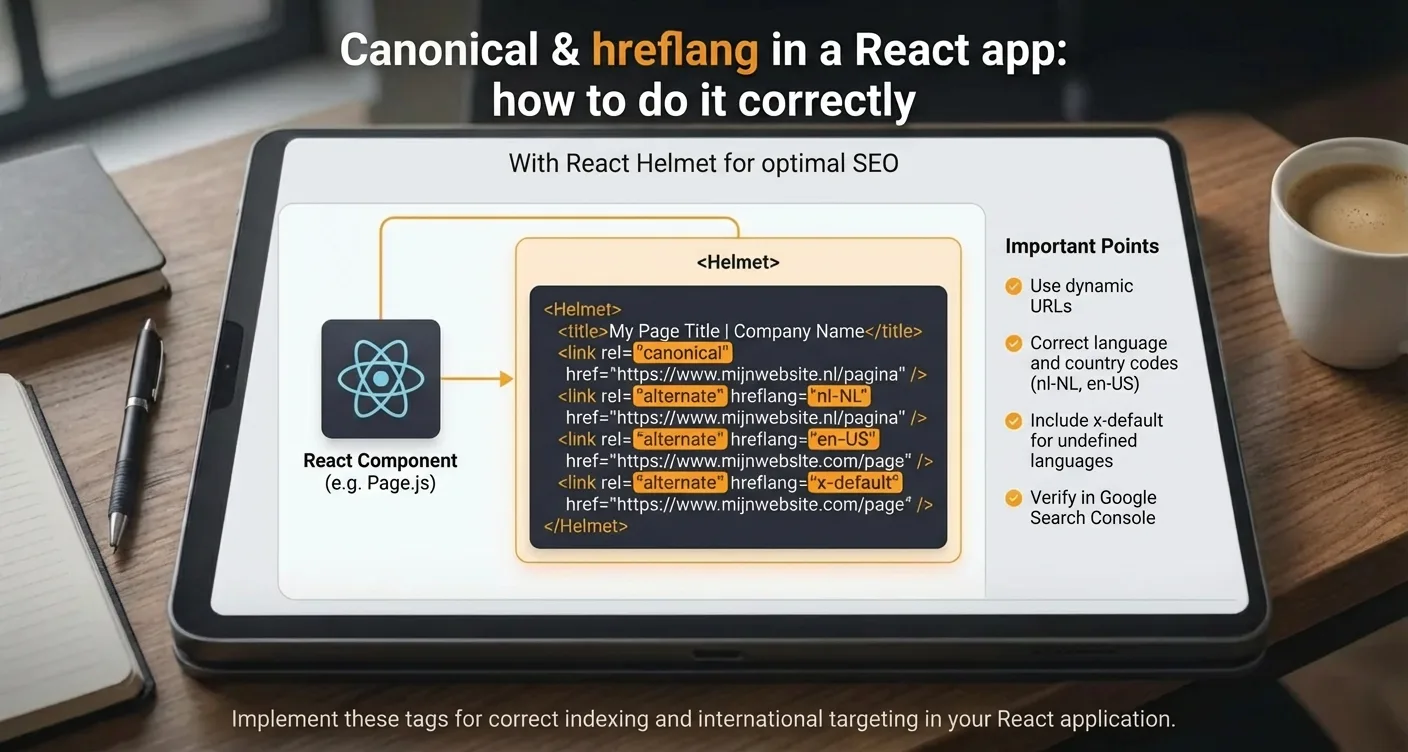
The foundation of Canonical & hreflang in your React app with React Helmet begins with defining link tags within the Helmet component. You wrap your page-specific components with Helmet to pass unique values. For the canonical tag, this means defining the absolute URL of the current page, which is crucial when using parameters for filtering that don't fundamentally change the content. In practice, this prevents search engines from seeing different versions of the same page as unique entities. Through the implementation of Canonical & hreflang in your React app for international SEO, you establish a solid basis for your visibility.
Using React Helmet allows you to dynamically inject these tags based on your application's current route.
"Consistently using canonical tags in a dynamic environment is the most important step to avoiding indexing issues with complex JavaScript frameworks."
Hreflang Attributes for Multilingual Applications
For applications operating in multiple countries, adding hreflang tags is indispensable for reaching the right target audience. With React Helmet, you can add a separate link tag for each language version that points to the alternative URLs. This process of configuring Canonical & hreflang in your React app requires accuracy, as each page must refer to itself and to all other language variants. If you overlook this, Google may not properly interpret the relationship between pages. When building, pay attention to the following:
- Always use absolute URLs instead of relative paths for maximum clarity.
- Ensure that country and language codes comply with ISO standards.
- Don't forget the x-default tag for users outside the specifically defined regions.
- Verify that your Canonical & hreflang in your React app strategy also works with client-side navigation.
For more information on technical standards, you can consult Google Search Central documentation. It's advisable to write a central helper function that generates the correct tags, allowing you to apply the Canonical & hreflang in your React app method uniformly everywhere without error-prone manual input.
Dynamic Hreflang Implementation for Multilingual React Sites
When building an international application, it's essential that search engines understand which language version is intended for which user. Because React uses an SPA architecture, meta-tags are not statically loaded. This means you must employ a robust method to pass the correct signals. Correctly configuring Canonical & hreflang in your React app requires a dynamic approach where the head section is updated as soon as the route changes. Without this synchronization, you risk search engines indexing the wrong language version, which negatively impacts user experience. Using libraries like React Helmet is indispensable here to keep metadata consistent.
The technical execution begins with mapping your supported languages to the corresponding URL structure. For each page, you must not only refer to the current language but also to all alternative versions, including an x-default. This is where implementation becomes a challenge, as data often needs to come from a CMS. You must ensure that the links are absolute and that each language version refers to itself and to all others. In practice, this means iterating through an array to generate the correct link tags. Flawless logic is crucial here to prevent indexing errors.

When working on your international SEO strategy, it's advisable to follow these steps: identify all available language paths for the current route and dynamically generate link tags with the rel="alternate" and hreflang attributes. Additionally, always include a self-referencing canonical tag to prevent duplicate content issues. Finally, check whether the x-default tag correctly points to the general landing page for international visitors without a specific match.
"An incorrect hreflang configuration can lead to a complete loss of international search results, as search engines can no longer validate the reciprocal relationship between pages."
It is crucial to understand that advanced implementation goes beyond merely placing tags; it involves validating reciprocity. Google requires that if page A refers to page B, page B must also refer back to page A. In a dynamic React environment, this can be complex when routes are loaded asynchronously. Therefore, it is recommended to use tools such as the Google Search Console to verify that the tags are correctly recognized. Thus, the process surrounding Canonical & hreflang in your React app doesn't stop at the code, but also includes monitoring. Remember that server-side rendering (SSR) with frameworks like Next.js can simplify this process by injecting the tags directly into the initial HTML.
Ultimately, a successful rollout hinges on precision. By using a central configuration for your locale settings, you prevent manual errors and ensure your application remains scalable. A well-thought-out architecture ensures that both users and search engines always receive the most relevant content. This strengthens your domain's authority in each target region and maximizes the return on your international content strategy.
Common Mistakes with Canonical Tags in Single Page Apps
Implementing SEO elements within a JavaScript environment brings challenges that often lead to indexing problems. One of the most common mistakes is leaving the canonical URL static while the user navigates through different routes. When the URL changes but the source code still points to the homepage, search engines no longer understand the site structure. This undermines the essence of Canonical & hreflang in a React app, as authority then flows to the wrong page. It is essential that each unique view receives its own, self-referencing canonical tag that is dynamically updated.
Client-Side Rendering Issues and Duplicates
In many cases, SPAs load content asynchronously, causing crawlers to sometimes see an empty page before JavaScript is fully executed. This causes confusion for Googlebot and significantly delays the process of correct indexing.

Another critical point is the use of relative paths instead of absolute URLs. For an effective strategy, complete URLs, including the protocol (https), must always be used. Additionally, we often see developers forgetting to synchronize hreflang attributes with canonicals. This creates conflicting signals: the canonical says page A is the source, while the hreflang refers to page B. These inconsistencies cause search engines to ignore the tags, resulting in duplicate content and a lower position in search results.
Best Practices for Flawless Implementation
- Ensure the canonical tag always points to the preferred version of the current URL.
- Update metadata immediately with every route change using tools like React Helmet.
- Verify that the implementation consistently accounts for trailing slashes.
- Avoid using multiple canonical tags on a single page.
"In practice, faulty canonicals in SPAs are often the main cause of deep pages not being indexed by search engines like Google."
It is crucial to understand that this process requires more than just code; it demands monitoring via Search Console. Without regular checks, small errors can have major consequences for visibility. For more technical details on how search engines handle JavaScript, you can consult Google Search Central documentation. A consistent approach prevents your content from being flagged as a duplicate. Therefore, always test your SSR output to see if the tags are correctly present in the initial HTML.
Testing and Verifying Your SEO Configuration in Google Search Console
After technical implementation is complete, it's essential to check whether Google correctly interprets the signals. The process surrounding Canonical & hreflang in a React app doesn't stop at the code; validation in Google Search Console is the only way to gain certainty. Use the 'URL Inspection tool' to test a page and view the rendered HTML. Here you can see if the tags added by React Helmet are actually present in the DOM that Googlebot sees. This is crucial because client-side rendering sometimes causes delays in metadata indexing.
Regularly check the 'Page indexing' report to see if Google accepts your specified canonical URLs. Within Google Search Console, the international targeting report provides insights into the status of your hreflang tags. When working on multilingual sites, you can immediately see if 'return tags' are missing. This often happens when page A refers to page B, but page B does not refer back to page A. Google will ignore these tags if reciprocity is absent. Also, look out for error messages about invalid country codes that could undermine the effectiveness of your international SEO strategy.
"Consistency between the sitemap and the on-page tags is key to flawless processing by search engines."
Utilize the Google Search Console interface to manually request indexing after major changes. By proactively monitoring, you prevent duplicate content issues from negatively affecting your rankings. Correctly handling these elements requires constant vigilance and periodic audits of your technical configuration.
- Use the URL Inspection tool for real-time rendering tests of your React components.
- Check the 'International targeting' report for missing return tags and language errors.
- Verify if the 'user-selected canonical URL' matches Google's choice.
- Monitor your sitemap's coverage in relation to the meta-tags present on the page.
Ultimately, a flawless configuration is the foundation for organic growth. By taking the data in Search Console seriously and responding immediately to warnings, you ensure that your React application performs optimally in a competitive search market.
Implementing SEO tags within Single Page Applications requires precision. With the correct approach to Canonical & hreflang in your React app: how to do it correctly, you prevent duplicate content and indexing issues.
By leveraging tools like React Helmet or server-side rendering via Next.js, you ensure that search engines immediately understand the page structure. This is crucial for international visibility and strong authority in Google's search results.
Continue to verify that tags are dynamically updated with every page change. A flawless technical configuration forms the basis for a scalable website that performs optimally worldwide. Do you need help optimizing your architecture? Contact our specialists today for a comprehensive audit of your source code and immediately improve your online visibility and technical score.
Frequently Asked Questions
What is the importance of canonical tags in a React application?
Canonical tags prevent duplicate content issues by signaling to search engines which version of a page is the original. In the guide 'Canonical & hreflang in your React app,' we explain how to dynamically manage these tags to consolidate SEO value.
How do you effectively implement hreflang attributes in a Single Page Application?
Because React apps often render client-side, you must use libraries like React Helmet to inject hreflang tags into the document's head. This ensures search engines display the correct language version to the right user based on their location and language settings.
Why is server-side rendering (SSR) often necessary for these SEO tags?
SSR ensures that search engines can read the canonical and hreflang tags directly in the source code without executing JavaScript. For the topic 'Canonical & hreflang in a React app,' SSR is crucial to prevent indexing issues on complex multilingual sites.
When should you use the hreflang 'x-default' value?
You use the x-default value when a page is not specifically targeted at a particular language or region, such as a language selection page. This helps search engines offer a default version to users who do not match the other defined language regions.
How SEO Supercharged helps you here
SEO Supercharged is fully online (service area: worldwide, online), so you can use it from anywhere.
The platform is built for Frontend developers, Technical SEO specialists, Digital marketing agencies, E-commerce managers, Full-stack developers, Software architects, Freelance web developers, Growth hackers, Product owners of international SaaS platforms.
You can use it for, among other things, React SEO audit, Canonical tag implementation, Hreflang configuration for SPAs, SSR & Hydration consultancy, Dynamic metadata management, React SEO training for developers.
Want to tackle this directly? Check your technical SEO with the Page Audit, or start a free SEO analysis.
Related articles
- React/Vite SEO Guide: Indexing, Meta Tags, SSR/Prerendering, and Sitemaps (No-Fuss Approach)
Learn to make your React/Vite site SEO-proof. Master indexing, meta tags, canonicals, SSR/prerender choices, sitemaps, robots, & structured data for.
- Structured Data Basics (Article, FAQ, Breadcrumb): What Truly Delivers Results?
Discover Structured Data Basics (Article, FAQ, Breadcrumb): what truly delivers results. Boost your SEO, improve CTR instantly. Learn more now!
- Dynamic, Multilingual, and Scalable Sitemap Generation for React Applications
Master dynamic, multilingual, and scalable sitemap generation for React apps. Boost your SEO, improve indexing, and ensure global visibility. Download our.
- Core Web Vitals for Speed, Conversion & SEO
Master Core Web Vitals for content sites to boost speed, user experience, and SEO rankings. Get practical tips for publishers to succeed!
- Redirects and Canonical Conflicts: Common Errors and How to Fix Them
Master Redirects & Canonical Conflicts. Fix common SEO errors, prevent ranking damage, and optimize your website for search engines. Read our complete guide!