Google Indexing Issues: Top 12 Common Causes & Fixes
Fix Google Indexing Issues: Top 12 Causes Explained
⚡ Essential Insight
Indexing issues prevent valuable web pages from appearing in search engines, directly leading to a loss of organic traffic and conversions. When Google can't index your content, your website remains hidden from your target audience, no matter its quality. Promptly identifying technical barriers like incorrect robots.txt settings or misconfigured canonical tags is essential for online discoverability. By systematically reviewing your site architecture, you can remove these blockages and strengthen your domain authority.
Why This Matters
Persistent indexing issues undermine your entire SEO strategy and require a thorough technical analysis.
- Noindex tags in the source code.
- XML sitemap optimization.
- Server errors and duplicate content.
A proactive approach to addressing indexing issues prevents you from missing out on returns due to technical invisibility.
What Are Indexing Issues and Why Do They Harm Your SEO?
When we talk about a website's search visibility, the foundation is always its presence in search engine databases like Google. Indexing issues occur when search engines struggle to find, crawl, or store pages in their index. This process is crucial because an unindexed page simply doesn't exist for the average searcher. It's like a book that's been written but never added to a library's catalog; no one will ever be able to borrow or read it. For website owners, this means a direct loss of potential traffic and visibility.
Without proper indexing, your valuable content and products remain invisible to your target audience, no matter how well the content is written.
The Impact of Technical Barriers on Your Search Rankings
The consequences of these technical shortcomings extend beyond just a missing page. When Google repeatedly encounters incorrect indexing settings, it can damage the overall trust in the technical integrity of your entire domain. Search engines allocate a limited budget to crawling your site. If this budget is wasted on dead ends or blocked resources, truly important pages often remain undiscovered. This leads to a vicious cycle where your authority stagnates, and competitors, who have their technical affairs in order, effortlessly surpass you in search results.
Promptly identifying and solving indexing issues for better visibility is essential for any digital growth strategy. Often, the causes lie in misconfigured robots.txt files, noindex tags accidentally left behind after a testing phase, or complex URL structures that confuse crawlers. In practice, we see many companies unknowingly blocking their own success by erecting these invisible walls for search engines.
A healthy website starts with a transparent structure that invites exploration by both human visitors and algorithms.
Why Google Sometimes Ignores Your Pages
ℹ️ Key Reasons
There are various reasons why indexing issues can arise, ranging from duplicate content to slow loading times that cause the crawler to abandon the page. Google aims to offer only the most relevant and technically sound pages to its users. If a page contains too many errors or doesn't meet quality guidelines, the search engine might decide to skip indexing it. This is often a sign that deeper optimizations are needed. For those seeking professional support in structuring a website, a visit to SEO Websites can offer valuable insights to overcome these hurdles.
- Incorrect sitemap configuration, causing new content to go unnoticed.
- The use of canonical tags pointing to incorrect URL versions.
- Server errors that temporarily or permanently block search engine access.
- Pages located behind a login screen, making them inaccessible to crawlers.
Check Your Robots.txt File for Blockages
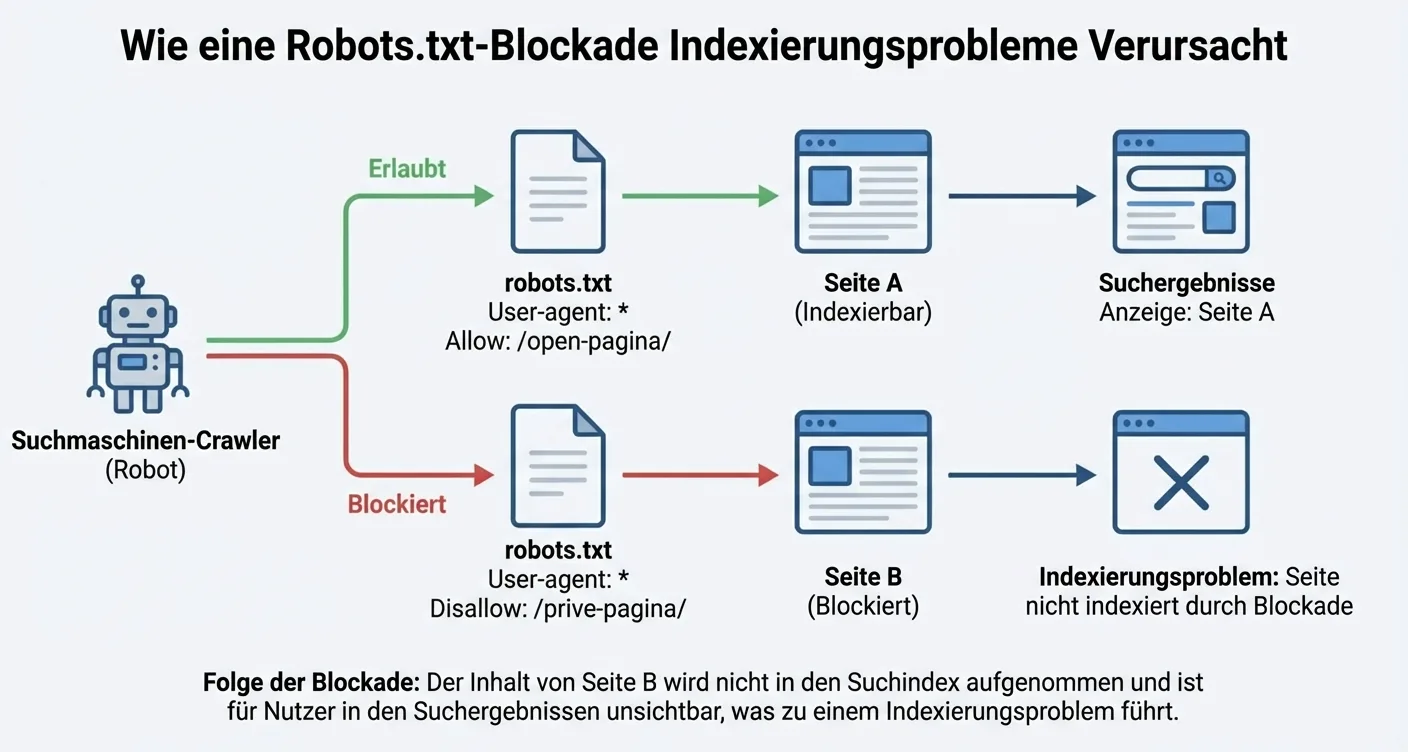
The robots.txt file is often the first place search engines look when they visit your website. This small text file acts as a traffic controller, determining which folders and pages are accessible to crawlers like Googlebot. When this file contains incorrect instructions, immediate and persistent indexing issues arise, which can severely harm your organic search visibility. It's essential to understand that an erroneous 'Disallow' rule can make entire sections of your site invisible to search engines, even if the rest of your technical SEO is perfectly in order.
How to Identify Critical Errors in Robots.txt?
The most common cause of indexing issues due to robots.txt is accidentally blocking the entire website after a migration or during a testing phase. This often happens by leaving the 'Disallow: /' rule in place, which effectively tells every bot that the entire site is off-limits. Therefore, it's crucial to regularly check your file's syntax using tools like Google Search Console. Here, you can specifically test whether certain URLs you want to appear in search results are not unintentionally blocked by a restrictive rule in your server's root directory.
📋 Optimize Your Workflow
Besides manually checking your code, you can also leverage smart tools like the AI Product Generator to optimize your workflow.
Why This Matters
"A minor typo in your robots.txt can mean the difference between a top position in Google and total invisibility in search results."
The Impact of Crawl Efficiency on Your Rankings
When search engines struggle to navigate your site, they waste their 'crawl budget' on irrelevant pages or get stuck on blockages. This exacerbates existing technical indexing issues, as new content isn't picked up and processed in the index promptly. By strategically using the robots.txt file, you direct crawlers immediately to the most relevant parts of your website. It's a powerful tool for setting priorities, provided you know exactly which directories to exclude and which to open for public indexing by external search engines.
⚡ Remember This
Remember that solving indexing issues through robots.txt configuration is a precise process where every rule counts for your success.
To keep your website healthy, you can take the following steps for better control:
📝 Check Sitemap Location
Verify that the sitemap location is correctly specified at the bottom of the file.
📝 Verify Resources
Ensure that important resources like CSS and JavaScript are not blocked.
📝 Test with Search Console
Use the robots.txt tester in Search Console to validate live changes.
📝 User-Agent Definition
Ensure the User-agent is correctly defined for specific bots.
By periodically checking these elements, you prevent unexpected indexing issues from hindering your growth.
Identifying Incorrect Use of the Noindex Tag
⚡ Crucial Step
Detecting a misplaced noindex tag is a crucial step in resolving persistent indexing issues within your digital strategy. When a page is accidentally given this instruction, you explicitly tell search engines to completely ignore its content for search results, which can be disastrous for your organic visibility. This error often creeps in during the transition from a test environment to the live website, where developers forget to remove blockages intended to prevent duplicate content during the development phase. Identifying these hidden barriers requires a systematic approach, thoroughly analyzing both the source code and HTTP headers to ensure valuable pages become visible to the public again.
Always start by checking the source code of your most important landing pages for the presence of the meta-robots tag with the value 'noindex'.
Technical Detection Methods
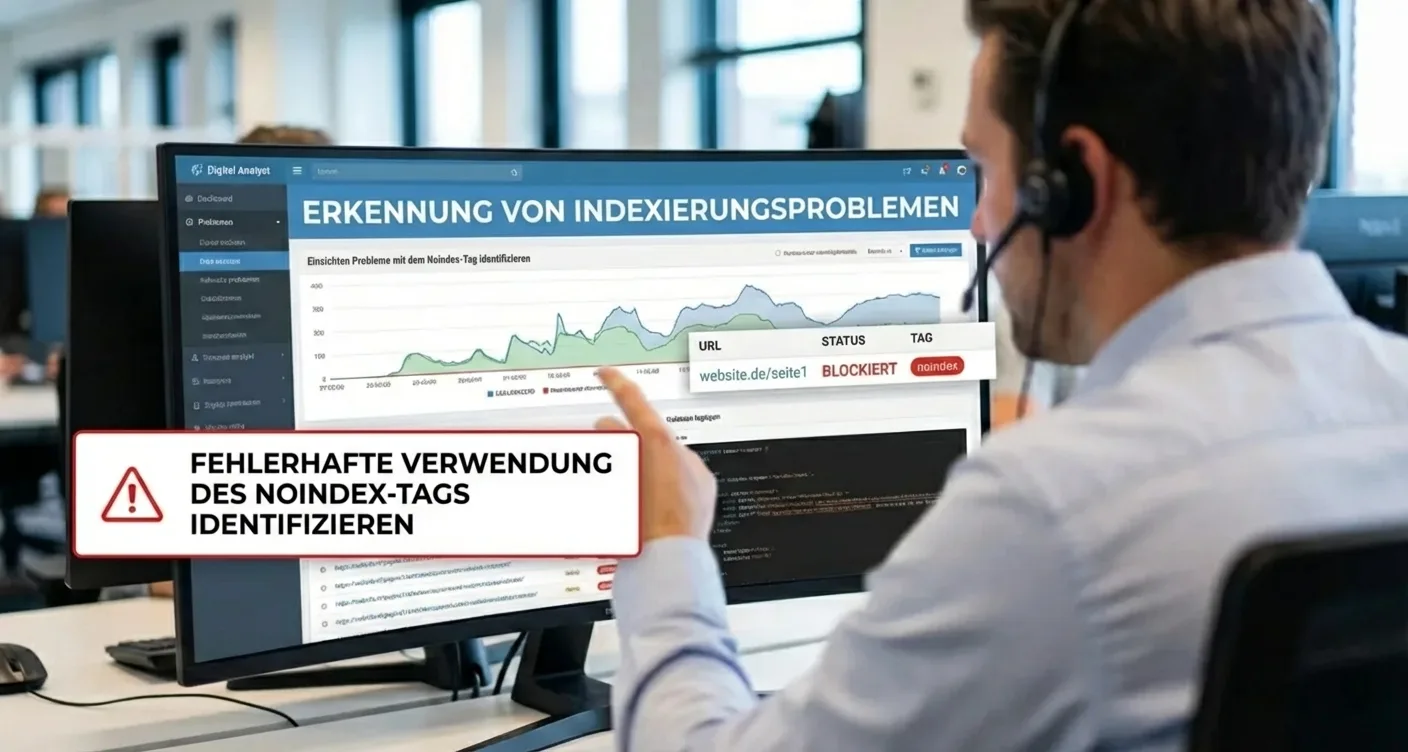
Beyond the standard meta tags in the HTML section, indexing issues due to noindex settings can also be hidden deeper within the server configuration via the X-Robots-Tag in the HTTP header. This is a less visible method often used for PDF files or images, but it can accidentally be applied to entire directories due to a misconfiguration in the .htaccess file. To effectively check this, you can use specialized tools like the SERP snippet generator to see how your pages are technically presented to search engines. It's essential to understand that a noindex instruction always takes precedence over a sitemap entry, keeping your pages invisible despite your efforts to submit them.
Important Lesson
"A single line of code can mean the difference between a top position and total invisibility in search engines."
Regular website audits are necessary to prevent new indexing issues from arising after every software update or content modification.
To get a complete picture of your website's status, you can take the following steps during your inspection process:
📝 Inspect Source Code
Use your browser's 'Inspect Element' function to search for 'noindex' in the head section.
📝 Consult Google Search Console
Consult the reports in Google Search Console to see which pages are excluded due to the noindex tag.
📝 Perform a Full Crawl
Perform a full crawl with SEO software to identify indexing issues caused by incorrect meta tags on a large scale.
📝 Check Robots.txt
Check your robots.txt file to see if there are conflicting instructions blocking access.
If you notice that important pages are not appearing in search results, it's advisable to conduct an in-depth analysis of your site's technical structure. Resolving indexing issues begins with understanding the hierarchy of search engine instructions, where the noindex tag often represents the most powerful blockage that must be manually removed.
Indexing Issues Due to Poor Internal Link Structure
⚡ Fundamental Principle
A well-thought-out website architecture forms the foundation for search engine optimization. When the internal linking structure is chaotic, indexing issues inevitably arise. Googlebot and other crawlers use links to navigate from one page to another. If important pages are buried deep in the hierarchy or receive no incoming links at all, they simply won't be found. This results in valuable content remaining invisible to potential visitors, simply because the technical signposts are missing to guide the search engine to the correct destination within your domain.
Without a logical structure, you waste valuable crawl budget on irrelevant pages while your core pages are ignored.
The Impact of Orphan Pages and Deep Hierarchies
Orphan pages are URLs that are not linked to by any other page on the website. For search engines, these pages are virtually undiscoverable, directly leading to persistent indexing issues for new websites. Additionally, click depth plays a crucial role. Pages that are more than three or four clicks away from the homepage often receive lower priority. A flat structure ensures that authority is better distributed across the entire site, giving every page a fair chance to be included in Google's search results.
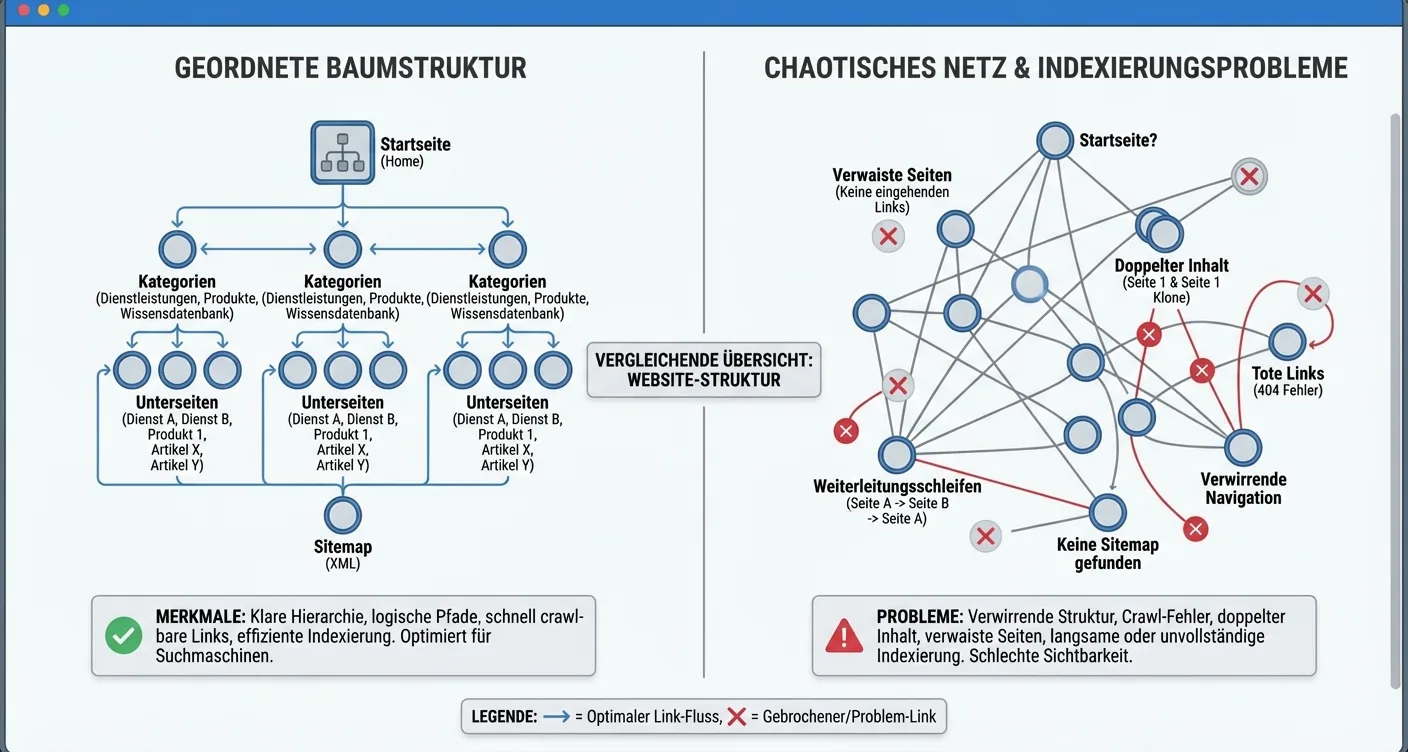
It's essential to regularly perform a technical audit to identify and immediately resolve these hidden barriers.
Metaphor
"A website without internal links is like a library where the books are walled up. The information is present, but no one can access it."
To effectively tackle indexing issues, you can optimize the following elements within your navigation structure:
📝 Clear Menu Structure
Use a clear menu structure that makes the main categories directly accessible.
📝 Implement Breadcrumbs
Implement breadcrumbs to help both users and crawlers understand a page's context.
📝 Relevant Text Links
Ensure relevant text links within your blog articles to related services or products.
📝 Utilize an XML Sitemap
Utilize an XML sitemap, but do not rely solely on it for complete indexing.
Improving internal link equity not only helps resolve persistent indexing issues but also strengthens the relevance of your most important keywords. By strategically linking with appropriate anchor text, you signal clearly about the target page's topic. Solving indexing issues through internal links requires a consistent approach where every new page is immediately integrated into your existing web of content. Don't forget that a strong brand identity also contributes to your domain's authority.
📋 Strengthen Your Brand Identity
You can use a branding generator to enhance your professional appearance.
A healthy link structure is the fastest route to a fully indexed website that performs optimally in search engines.
The Impact of Duplicate Content on Your Indexing
⚠️ Warning
When search engines like Google encounter identical or very similar texts on different URLs, it creates confusion for the algorithm. The search engine must decide which version of the page is most relevant to the user, which often leads to significant indexing issues. Instead of all your pages ranking well, the wrong page might be displayed, or your website's authority could become fragmented across multiple URLs. This phenomenon is known as 'keyword cannibalization,' where your own pages compete with each other for the same position in search results.
Duplicate content forces search engines to make choices you'd rather control yourself to prevent persistent indexing issues.
How Duplicate Content Wastes Your Crawl Budget
Search engines have a limited crawl budget for each website, meaning they only scan a certain number of pages per visit. If your site is full of duplicate content, the crawler wastes valuable time processing already known information, causing new or updated pages to simply go unnoticed. This process significantly exacerbates existing indexing issues on large websites.
📋 Structure is Essential
Therefore, it's essential to maintain a clear structure, for example, by using a product category architect that helps organize unique content paths.
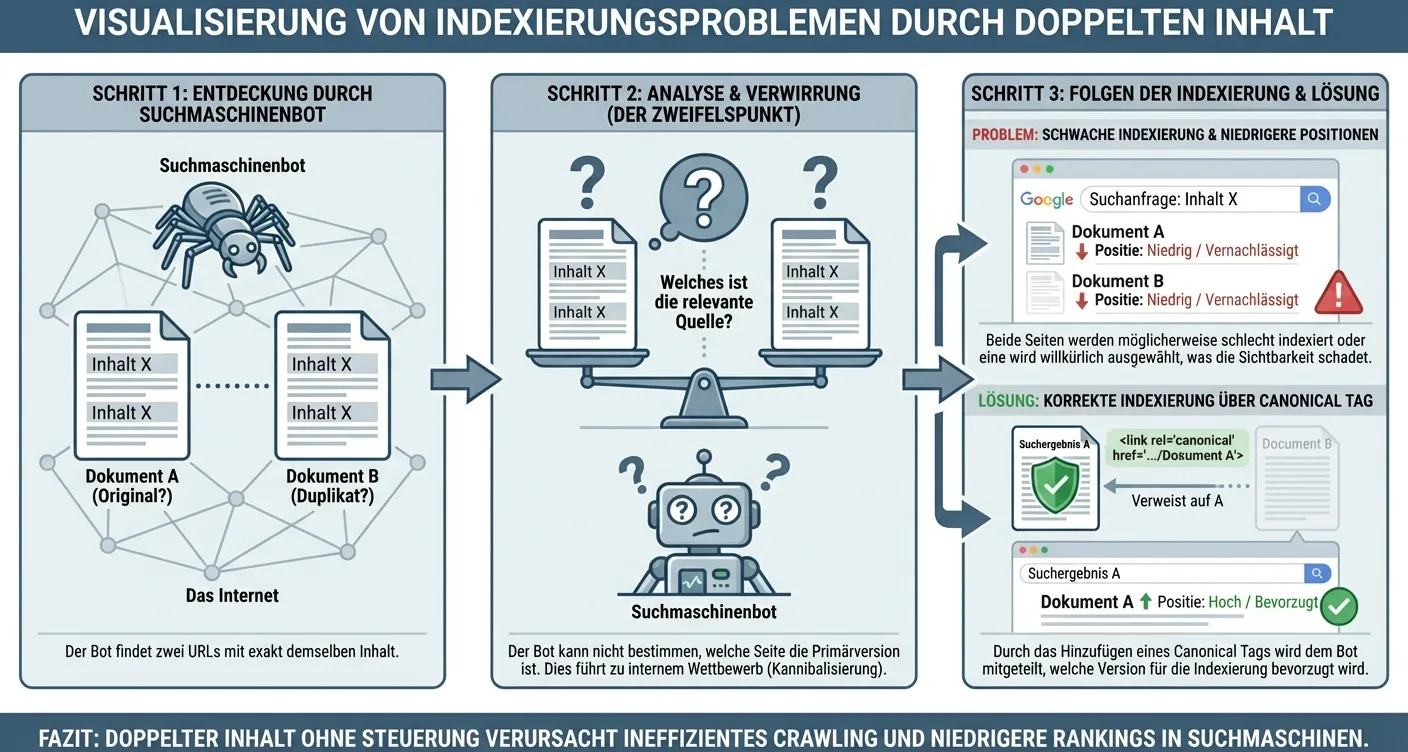 Without this guidance, search engines get caught in an endless loop of repetition, which harms your domain's overall visibility.
Important Consideration
"Duplicate content isn't necessarily a penalty, but it's an efficiency killer that severely disrupts communication between your server and the search engine."
Strategies to Minimize Duplicate Content
To limit the negative impact on your search visibility, you need to be proactive in managing your web content. Using canonical tags is one of the most effective methods, as it explicitly tells the search engine which version of a page should be considered the original. This makes solving indexing issues with canonical URLs an integral part of your technical SEO strategy. Additionally, it's advisable to regularly conduct an audit to detect and eliminate unintended duplicates, such as print versions of pages or session IDs in URLs.
📝 Use 301 Redirects
Use 301 redirects to guide old pages to the new, unique versions.
📝 Set Parameters in Search Console
Set parameters in Google Search Console to exclude URL variations.
📝 Unique Metadata
Ensure unique meta descriptions and titles for each individual page.
📝 Block Internal Search Results
Prevent internal search results from being indexed by using robots.txt.
By consistently following these steps, you reduce the chance of complex indexing issues and ensure that the unique value of your content is fully recognized by algorithms.
Technical Errors: Crawl Budget and Server Response
⚡ The Backbone of Discoverability
When we talk about a website's technical health, server response and crawl budget form the backbone of successful organic discoverability. Googlebot doesn't have infinite time to explore every corner of your domain; there's a strict limit to how many pages a crawler visits within a specific timeframe. If your server responds slowly or too many unnecessary scripts are loaded, the search engine wastes valuable time. This inevitably leads to persistent indexing issues, where new or updated content simply isn't included in search results because the bot has already ceased access before reaching the relevant pages.
A slow server often forms the invisible barrier preventing your most valuable pages from being discovered by search engines in a timely manner.
Optimizing Your Crawl Budget
Managing your crawl budget requires a strategic approach where you prioritize pages that genuinely add value for the user. Many websites struggle with indexing issues due to duplicate content or endless filter combinations in webshops that trap the crawler in a labyrinth. By using a robots.txt file, you can instruct search engines to skip irrelevant directories. This leaves more room for your main pages. It's essential to understand that solving technical indexing issues through server optimization has a direct impact on how often and how deeply your website is crawled by Google.

Besides structure, server response (TTFB - Time To First Byte) plays a crucial role in this process. When a server takes too long to send the first byte of data, the search engine interprets this as a sign of instability or poor performance. This often results in a reduced crawl frequency. To prevent these technical indexing issues, it's advisable to invest in high-quality hosting and caching mechanisms. A fast server ensures that the bot can process more pages in the same amount of time, significantly increasing the chances of full site indexing.
Regularly check your log files to see where crawlers get stuck or experience unnecessary delays during their visit to your domain.
Server Errors and Status Codes
Status codes like 5xx errors are detrimental to your reputation with search engines. When Google repeatedly encounters server errors, the crawler will visit the site less frequently to avoid further burdening the server. This creates a vicious cycle of indexing issues for large websites.
📋 Monitor Search Console
Therefore, it's crucial to closely monitor your Search Console for notifications about server accessibility. For more in-depth information on improving your online presence, you can consult our blog.
ℹ️ Critical Points
- Minimize the number of redirects (301/302) to keep the crawl chain short.
Sitemap Configuration and Manual URL Inspection
⚡ Roadmap for Search Engines
A correctly configured XML sitemap acts as a roadmap for search engines, allowing them to navigate your website's structure more efficiently. When this map contains errors or provides outdated information, persistent indexing issues often arise, hindering the visibility of your most important pages. It's essential that the sitemap exclusively contains canonical URLs with a 200 status code, so crawlers don't waste time on redirects or non-existent pages. By prioritizing quality content within your sitemap configuration, you send a clear signal to Google about which sections of your domain offer the most value to the end-user.
Manually submitting URLs via Google Search Console is a powerful method to accelerate solving indexing issues with sitemaps.
Manual URL Inspection and Validation
The URL inspection tool provides deep insight into how Google sees a specific page and whether there are technical barriers preventing its inclusion in the index. In practice, many administrators forget to request a new indexing after a technical adjustment, causing old error messages to persist unnecessarily. By using the live testing feature, you can immediately verify whether the current code meets the search engine's requirements. This process is crucial for identifying indexing issues due to technical errors in the sitemap, as it bridges the gap between your database and the search results.
To refine your strategy, you can follow these steps for optimal configuration:
📝 Remove Noindex Tags
Remove pages with a 'noindex' tag from the XML sitemap to prevent crawler confusion.
📝 Group URLs
Group URLs into different sitemaps if your website contains more than fifty thousand pages.
📝 Check Coverage Reports
Regularly check coverage reports for specific indexing issue alerts.
📝 Sitemap Location in Robots.txt
Ensure the sitemap location is correctly specified in the robots.txt file for maximum discoverability.
Constant Monitoring
Consistently monitoring your sitemap status is the only way to guarantee preventing structural indexing issues in the long term.
If you notice that certain pages are not being indexed despite a correct sitemap, manual inspection can provide solutions. You can see if the page has been crawled but not yet indexed, which often indicates a lack of authority or unique content. By combining these insights with a streamlined sitemap structure, you significantly minimize the chance of indexing issues for new websites.
Action Plan to Permanently Resolve Your Indexing Issues
✨ Permanently Resolve Indexing Issues
Addressing indexing issues structurally requires a thorough analysis of your website's technical foundations. When Google ignores certain pages, the cause often lies with a poor internal linking structure or incorrect configurations in the robots.txt file. It's essential to first check if the URLs in question haven't been accidentally excluded via a noindex tag. By systematically removing each barrier, you ensure that search engines can effortlessly navigate your content and correctly include it in their database for relevant user queries.
Effectively resolving indexing issues always begins with a comprehensive audit of your Google Search Console data to identify patterns in error messages.
Technical Optimization and Sitemaps
A crucial step in this process is submitting an updated XML sitemap. This file acts as a roadmap for crawlers and helps prioritize important pages. Additionally, check that your server response is swift; slow loading times can cause crawlers to abandon the site prematurely, indirectly leading to persistent indexing issues for new websites. Ensure all canonical tags are correctly configured to avoid duplicate content, as confusion about the original source often results in pages being excluded from search results.
Follow these steps for optimal results:
📝 Verify URL Status
Verify the status of your URLs in Google Search Console.
📝 Check Sitemap
Check the accessibility of your most important pages via the sitemap.
📝 Remove Unnecessary Redirects
Remove unnecessary redirects that unnecessarily burden the crawl budget.
📝 Optimize Internal Link Equity
Optimize internal link equity to deeper pages.
Important Rule of Thumb
"A healthy website is one where every valuable page is reachable within three clicks for both the user and the search engine bot."
Furthermore, it's wise to regularly perform manual inspections for specific URLs that are lagging. Use the 'URL Inspection tool' to directly request indexing after implementing changes. Solving indexing issues through technical SEO is a continuous process that needs close monitoring to guarantee long-term success. Don't forget that quality content remains the foundation; even with the best technical setup, Google will refuse to index pages that offer no added value. By making analyzing complex indexing issues a fixed part of your maintenance routine, you maintain strong online visibility.
ℹ️ Important Tip
Always stay alert for sudden drops in the number of indexed pages in your dashboard.
⚡ Core Insight
Promptly recognizing indexing issues is essential for your online visibility.
📋 Foundation for SEO
By systematically addressing technical hurdles like incorrect robots.txt settings or a poor internal linking structure, you lay a solid foundation for your SEO strategy. Therefore, regularly check your Search Console data to quickly identify and resolve blockages.
Ready to Tackle Your Indexing Issues?
In summary, resolving persistent indexing issues requires a keen eye on both your technical configuration and the overall quality of your content. Whether it's removing noindex tags, optimizing your sitemap, or improving loading speed, every adjustment contributes to better visibility in Google.
Start an audit today →Ensure your valuable pages get the organic rankings they deserve.
❓ What exactly are indexing issues?
Indexing issues occur when search engines like Google fail to include pages from your website in their database. This makes your content undiscoverable to users, directly impacting your organic traffic negatively.
❓ How can I check if my website has indexing issues?
You can easily check this via Google Search Console under the 'Pages' report. If you notice that important URLs are listed as 'Excluded', there's a good chance you're dealing with specific indexing issues that need to be resolved.
❓ Why does a robots.txt file sometimes block indexing?
A robots.txt file contains instructions for search engines on which parts of the site they should not visit. If a 'Disallow' rule is accidentally set for important directories, it blocks access and prevents pages from being indexed.
❓ When do new pages typically become visible in search results?
This process can vary from a few hours to several weeks, depending on your website's authority. By submitting an XML sitemap and requesting manual indexing, you can speed up this process and prevent delays.
Service & Contact
Location: High in Google
Service Area: In the Cloud
Services: Google Indexing Audit, Crawl Budget Optimization, Technical SEO Checkup, Search Console Troubleshooting, Sitemap & Robots.txt Configuration, Canonical Tag Analysis, JavaScript Rendering Scan
Target Audience: E-commerce Entrepreneurs, SEO Specialists, SME Marketing Managers, Web Developers, Freelancers with a business website, Content Strategists, Digital Agency Owners, Affiliate Marketers, B2B Marketing Professionals
Related articles
- Webpage Audit: From 'Why Isn't My Page Ranking?' to Actionable Fixes
Learn how a Webpage Audit quickly identifies why your page isn't ranking and reveals the most impactful fixes. Includes a checklist, prioritization guide.
- Boost Your Google Rankings: Get a Professional SEO Audit
Want more organic traffic? Get a professional SEO audit to uncover all improvement areas. Start boosting your Google rankings today!
- Multilingual Technical SEO Audit: Optimize Your Global Strategy
Boost your global search visibility with a multilingual technical SEO audit. Find critical improvement areas & optimize your international website now!
- Prioritizing Your Audit Action Plan: A Step-by-Step Guide
Learn how to effectively prioritize your audit action plan for maximum business impact. Optimize processes, allocate resources wisely, and achieve better.
- Core Web Vitals Content
Discover how Core Web Vitals content improves search results. Learn about LCP, FID, and CLS, and optimize your website today for SEO success!