WooCommerce Push: Field Mapping & Export Best Practices for Flawless Data Synchronization
WooCommerce Push: Field Mapping & Export Best Practices Guide

A successful WooCommerce push, including field mapping and export best practices, ensures seamless synchronization between your online store and external ERP systems. By correctly applying this methodology, you prevent inaccurate product information and optimize your data flow for maximum efficiency within your e-commerce architecture. This process requires precise attribute assignment to guarantee data consistency.
The foundation of modern data management rests on a solid WooCommerce push: field mapping and export best practices for reliable results.
- Accurate field mapping prevents critical synchronization errors.
- Efficient export methods accelerate daily data processing.
- Consistent product data directly increases customer satisfaction.
Implementing a strategic WooCommerce push is essential for scalability. Utilize advanced techniques to manage complex data structures. This process requires regular maintenance to meet API requirements.

What is a WooCommerce Push and Why is Data Mapping Crucial?
In the world of e-commerce, a WooCommerce push is an essential process where product data, order information, or customer details are sent from your online store to an external system. This could be an ERP system, a marketplace, or accounting software. The goal is to automate information flows, making manual entry unnecessary. Without proper structure, this process can lead to incorrect inventory levels or incomplete descriptions. Therefore, understanding the technique behind a WooCommerce push and field mapping is the first step towards a scalable online business.
Data mapping forms the bridge between your online store and the receiving party. It ensures that information ends up in the correct field.
The Fundamental Role of Field Mapping in Data Transfer
When we talk about WooCommerce field mapping for online stores, we mean the process of linking attributes from WooCommerce to the required fields of external software. Think of connecting the 'SKU' in WordPress to the 'Item Number' field in your warehouse management software. If this link isn't accurate, the receiving system won't recognize the data, leading to synchronization errors. Systems often use different naming conventions for the same data, making a careful mapping process essential to ensure the integrity of your database during each export cycle.

The success of your automation depends on the quality of the source data. A WooCommerce push with mapping starts with cleaning up your database. Check whether mandatory fields, such as weight and VAT rates, are correctly filled in before the push occurs. Many online stores struggle with inconsistent data, which leads to rejections by external platforms. By establishing standards, you prevent the mapping logic from becoming unnecessarily complex and reduce the chance of technical glitches.
"Effective data mapping is not just connecting point A to point B, but ensuring that the meaning of the information isn't lost in transit."
Why Export Best Practices Make a Difference
In addition to technical mapping, the general export settings are crucial for the speed and reliability of synchronization. Adopting a WooCommerce push: field mapping + export best practices method also means thinking about the frequency of updates. Should a price change be pushed immediately, or is a batch export sufficient? Inventory updates are usually critical and require a real-time approach to prevent overselling. Furthermore, using filters during the export helps to send only relevant data, which reduces the load on your server.
- Use unique identifiers like SKUs to prevent duplicate records.
- Set fallback values for fields that may be empty in WooCommerce.
- Test the WooCommerce push with field mapping configuration first in a staging environment.
- Monitor the log files of your export plugin to detect errors early.
Implementing an advanced WooCommerce push: field mapping + export best practices guide helps refine these processes. By using tools like WooCommerce Product CSV Import Suite, you can manage complex data structures more easily. It is wise to work with transformation rules, where data is adjusted during the push, for example, by converting prices to a different currency. A well-thought-out WooCommerce push: field mapping + export best practices workflow saves hundreds of hours of manual correction work in the long run.
Step-by-Step Plan for WooCommerce Push: Field Mapping + Export Best Practices
Successfully synchronizing product data begins with watertight preparation. When embarking on a WooCommerce push: field mapping + export best practices, it is essential that every field in your online store has a specific counterpart in the receiving platform. This process ensures that titles, prices, and inventory levels are correctly transferred without information loss. An incorrect link can lead to empty product pages or inaccurate pricing information that pressures your margins. Therefore, a systematic approach where you check each attribute is the only path to a stable integration for your business.
WooCommerce push: field mapping + export best practices requires a close look at the source data to prevent synchronization errors.
The Essence of Accurate Field Mapping
When mapping fields, you must consider the data types that WooCommerce uses. A text field cannot simply be pushed to a numeric field without conversion. Using a step-by-step plan for WooCommerce push: field mapping helps identify bottlenecks before the export occurs. Think of matching SKUs, converting currency symbols, and correctly categorizing product variations that are more complex than simple products.
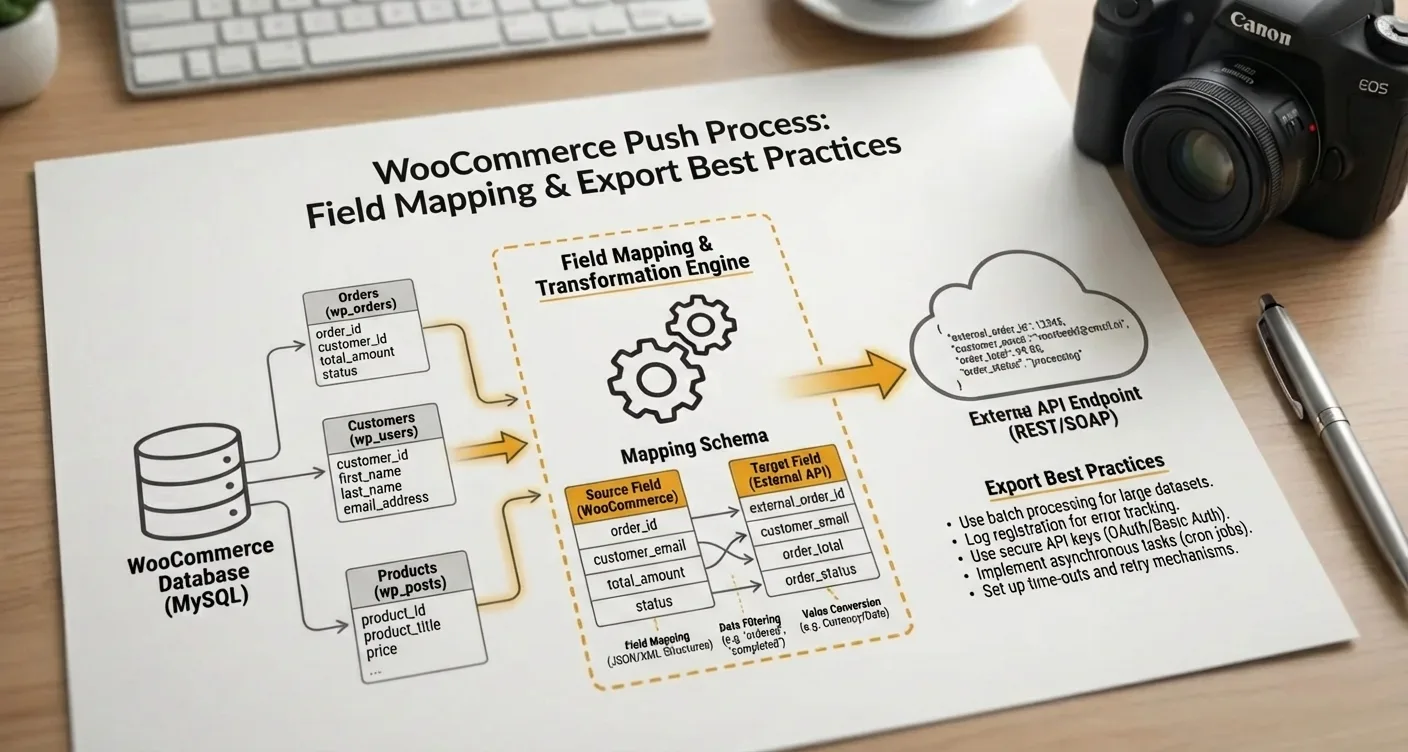
Adopting advanced WooCommerce push: field mapping + export best practices for online stores ensures that complex product attributes such as color and size remain consistent across all channels.
"Consistency in data mapping is the backbone of any automated online store; without a solid foundation in export settings, any scaling effort is doomed to fail due to technical errors."
To ensure the quality of your data, it is advisable to use the official WooCommerce documentation. This keeps you informed of changes in the database architecture that could impact your export best practices for WooCommerce data.
Best Practices for a Flawless Export
In addition to mapping, the frequency of the export is crucial for performance. A WooCommerce push: field mapping + export best practices strategy often involves using incremental updates instead of full database exports. This means that only modified products are pushed, which reduces the load on your hosting environment and increases speed. Online stores that use this method less frequently experience timeouts during peak hours.
Follow these steps for optimal configuration of your data flow:
- Inventory all mandatory fields of the target platform.
- Set fallback values for missing product information.
- Test the WooCommerce push: field mapping + export best practices method first in a staging environment.
- Monitor API logs for error messages after each major update.
- Optimize the batch size of the export to prevent server overload.
By following these guidelines, you create a robust system that can withstand growth. A well-executed WooCommerce push: field mapping + export best practices implementation saves hundreds of hours of manual corrections and customer service inquiries about incorrect information in the long run. The upfront investment of time is well worth it.
Common Mistakes in Product Field Mapping
The data integration process often seems simpler on paper than in practice, especially with a complex WooCommerce push: field mapping + export best practices strategy. A common mistake is ignoring data types between the source file and the online store environment. When a text field is linked to a numeric field, synchronization can stall or result in corrupted information. This leads to frustration and affects the customer experience when prices are displayed incorrectly. It is essential to validate and test each mapping beforehand in a staging environment before the final export occurs.
Owners often forget that an optimized WooCommerce push: field mapping + export best practices method depends on the consistency of source data.
Problems with Taxonomies and Attributes
When executing a WooCommerce push: field mapping + export best practices configuration, we often see that categories are sometimes misassigned. Instead of maintaining a hierarchical structure, products are dumped into flat lists, which makes navigation impossible. Skipping global attributes in favor of custom text fields is also a mistake. This causes you to lose the ability to use effective filters, which negatively impacts conversion. Field mapping requires an understanding of how WooCommerce stores data so that the export aligns with the existing architecture.

Another critical point is the absence of unique identifiers like SKUs during the WooCommerce push: field mapping + export best practices synchronization. Without a clear link, the system cannot recognize existing products, resulting in duplicate listings. This problem is exacerbated with variable products, where each child product (variation) needs specific mapping for attributes such as size. Manually correcting these errors takes significantly more time than initially setting up the mapping rules correctly and adhering to a strict protocol.
Apply the following list of key considerations when setting up your export process:
- Check whether mandatory fields are correctly assigned to the appropriate WooCommerce columns.
- Ensure a consistent currency format to prevent pricing errors during the WooCommerce push: field mapping + export best practices processing.
- Validate image URLs; a common error is mapping local paths that are not accessible.
- Use data cleansing tools to remove superfluous HTML tags.
"Errors in mapping are often not immediately visible, but only become apparent when the store's search function starts yielding illogical results."
Finally, it is essential to consider the server load during a large-scale WooCommerce push: field mapping + export best practices operation. Pushing thousands of products at once without batch processing can lead to timeouts. By dividing data into smaller segments, you maintain control and can detect any mapping errors more quickly without jeopardizing the entire database.
Advanced Techniques for Efficient Data Export
Optimizing your online store requires an understanding of how information flows, where WooCommerce push: field mapping + export best practices play a crucial role. When you send product data to external marketplaces, flawless synchronization is essential to prevent inventory discrepancies. By utilizing advanced filters within your export module, you can determine which attributes are included, which reduces the load on your server. Manually checking every column is an impossible task; therefore, automation via a robust WooCommerce push: field mapping + export best practices is the only scalable solution.
A correct configuration ensures that complex product variations are seamlessly translated into the required formats, which is essential for an optimized WooCommerce push: field mapping + export best practices strategy.
Automation and Validation of Data Fields
When setting up a WooCommerce push: field mapping + export best practices workflow, validating data before sending is a priority. In practice, we see that missing SKUs lead to rejections on advertising platforms, which impacts your visibility. By applying logical rules, you can transform fields; consider converting weights or merging titles for a better SEO value. Implementing a WooCommerce push: field mapping + export best practices system allows you to set up these transformations once.
"Consistency in data structures forms the backbone of any successful omnichannel strategy within the WordPress ecosystem."
- Use cron jobs to execute the WooCommerce push: field mapping + export best practices during off-peak hours.
- Regularly check the log files for synchronization errors between your database and the API receiver.
- Utilize the WooCommerce REST API for direct integrations.
Remember that an effective WooCommerce push: field mapping + export best practices method also considers the scalability of server resources.
Automation and Monitoring of Your WooCommerce Product Feed
Manually updating product data is no longer sustainable. To remain competitive, automation of your data flows is essential. By using a robust WooCommerce push: field mapping + export best practices method, you ensure that changes in inventory or prices are immediately synchronized with external channels. This prevents you from advertising products that are out of stock, which is crucial for the preservation of your ad budget. A well-configured automation acts as the backbone of your online store strategy.
The core of successful automation lies in the accurate configuration of your export scripts and plugins.
Monitoring and Error Detection
Even with automation, errors can occur. Therefore, constant monitoring of your WooCommerce push: field mapping + export best practices strategy is necessary to detect deviations in a timely manner. Commonly used tools offer error reports that indicate when a mandatory field, such as an EAN code, is missing from the export. By taking these notifications seriously, you ensure the continuity of your visibility on major marketplaces and comparison tools.
"Effective automation is not just about sending data, but continuously optimizing the quality of that data for each specific channel."
When implementing an advanced WooCommerce push: field mapping + export best practices approach, it is wise to use filters. This allows you to exclude specific product groups that are not profitable. Follow these steps for a healthy feed:
- Check synchronization logs daily for critical errors.
- Validate whether the WooCommerce push: field mapping + export best practices settings still meet the requirements.
- Use external tools like Google Search Console to monitor indexing.
- Test new mappings first in a staging environment before going live.
Consistently applying the WooCommerce push: field mapping + export best practices guide helps you lower technical barriers. This keeps your focus on growth instead of manual corrections.
A successful WooCommerce push: field mapping + export best practices forms the basis for flawless synchronization.
By correctly mapping fields and consistently validating data, you prevent costly errors in your inventory management. Adhering to the right export best practices also ensures faster processing times and an improved user experience for your customers.
Optimizing your data flows requires precision but delivers significant time savings for your online store in the long run. Make sure you regularly check your mapping settings and adjust them when your product assortment changes or expands. Do you want to start automating your processes immediately? Contact our specialists today for a tailored advice plan or check out our comprehensive guides to take your conversion to the next level. Together, we build a scalable and future-proof e-commerce environment ready for any digital challenge.
Frequently Asked Questions
What is the importance of correct field mapping in a WooCommerce push?
Correct mapping ensures that product data from WooCommerce seamlessly aligns with the fields of the external platform. This prevents errors in the product display and is an essential part of WooCommerce push: field mapping + export best practices.
How can you optimize export performance for large product catalogs?
For large catalogs, it is advisable to process exports in batches to prevent server overload. Applying WooCommerce push: field mapping + export best practices helps efficiently synchronize inventory and prices without delay.
Why should custom attributes be manually mapped during export?
Standard export tools do not always recognize unique metadata or custom fields from specific plugins. By using manual mapping, you guarantee that all relevant product information is correctly transferred to the target channel.
When is it necessary to set up automatic synchronization?
Automatic synchronization is crucial when you want to keep inventory levels and prices up-to-date in real-time across multiple marketplaces. This minimizes the chance of overselling and improves the overall reliability of your online store data.
How SEO Supercharged helps you here
SEO Supercharged is fully online (service area: worldwide, online), so you can use it from anywhere.
The platform is built for Online Store Owners, E-commerce Managers, WordPress Developers, Data Integration Specialists, B2B Wholesalers, Dropshipping Entrepreneurs, Digital Agencies, Financial Administrators, Marketplace Specialists.
You can use it for, among other things, WooCommerce Field Mapping Setup, Export Best Practices Audit, Product Data Optimization Scan, Feed Management Implementation, Attribute Mapping Consultation, CSV & XML Export Configuration, Data Push Integration Check.
Want to tackle this directly? Structure your shop with the Productmap Architect, or start a free SEO analysis.
Related articles
- Product Map Architect: Categories, Filters, Canonicals, and Scalable E-commerce SEO
Learn to build a scalable e-commerce SEO structure: categories, faceted filters, canonicals, internal links, schema, and unique product content—avoiding.
- Beyond Price & Picture: Why Great Product Pages Drive Sales
Learn why optimized product pages need compelling content, unique images, FAQs, and SEO data to rank higher, convert visitors, and boost sales.
- Unique Product Descriptions: Avoid Thin Content for Better SEO
Learn how to write unique product descriptions that avoid thin content for superior SEO results. Optimize your online store now to boost conversions and.
- What Are the Minimum Requirements for Product Schema Markup?
Learn the minimum requirements for Product Schema (Product/Offer/Review) to prevent Google Search Console errors. Discover essential fields for rich results.
- Comprehensive Product Page SEO Template for E-commerce Success
Unlock higher rankings and boost conversions with our comprehensive product page SEO template. Optimize every field for maximum organic visibility and.